GenX Toolchain

Vehicle Network Definition Tool

VxNet

Integrated within SmartWheels GenX — no separate installation required

VxNet is ANCIT's purpose-built DBC editor for CAN-based automotive networks. Create and edit DBC files from scratch, import vendor network databases, and merge multiple vendor DBCs into a single ECU-specific network definition — all within the GenX toolchain.
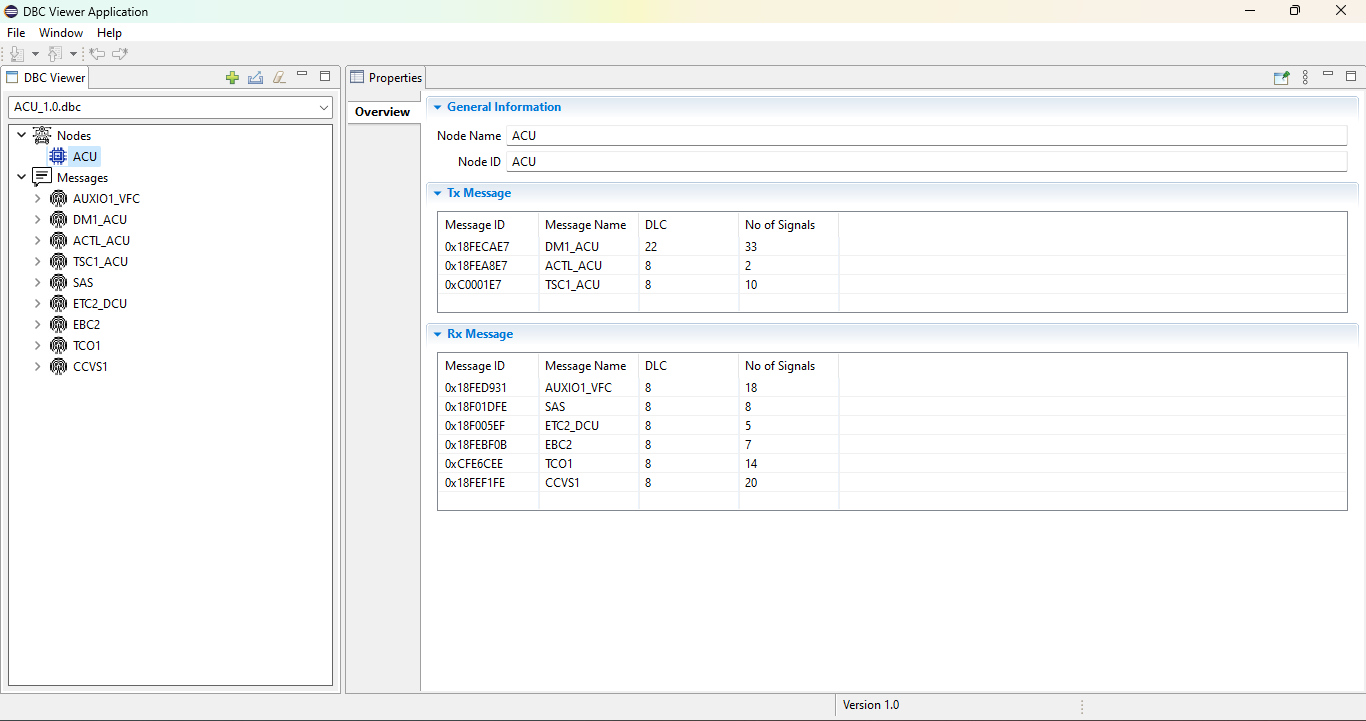
VxNet – Vehicle Network Definition Tool
CAN FD
Supported
Multi-DBC
Merge
ARXML
Export
GenX
Integrated

Part of the SmartWheels GenX Toolchain

VxNet is the network definition layer inside GenX. Define your vehicle's CAN network first — then configure ECU behaviour, diagnostics, and generate code — all in one platform.

Import
Vendor DBCs
VxNet
Define / Merge
GenX Config
ECU Behaviour
Code Gen
Production Ready
Flash ECU
SmartWheels

Everything You Need to Define a Vehicle Network

From raw signal definition to multi-ECU merged databases — VxNet handles the full DBC lifecycle.

DBC Creation & Editing

Create CAN network databases from scratch. Define messages, signals, nodes, attributes, and value tables with a structured editor designed for automotive engineers.

Vendor DBC Merging

Merge multiple vendor-supplied DBC files into a single consolidated ECU DBC. Resolve conflicts, filter relevant messages, and build your own network definition from OEM-provided databases.

Excel CAN Matrix Import

Import a CAN signal matrix from Excel and automatically generate a DBC file — eliminating manual entry and reducing errors in the network definition process.

Multi-Format Export

Export DBC files to ARXML (AUTOSAR), Excel, C header files, and subsets of the original DBC. Seamlessly feed into AUTOSAR toolchains or your GenX configuration.

CAN FD Support

Full CAN FD compatibility — define extended frame messages, bit rates, and FD-specific signal attributes for modern high-speed automotive networks.

GenX Integration

VxNet is embedded inside SmartWheels GenX. Network definitions flow directly into ECU configuration — no file handoffs, no format conversions, no broken toolchains.

From Vendor DBC to ECU Network in Minutes

VxNet is built around the real workflow of an ECU software engineer — not the other way around.

1
Collect Vendor DBCs

Gather DBC files from your OEM, sensor suppliers, or other ECUs in the network. Import them directly into VxNet.

2
Filter & Merge

Select the messages and signals relevant to your ECU. Merge them into one clean DBC — resolving naming conflicts and address collisions.

3
Edit & Validate

Add custom messages, define Tx/Rx nodes, and validate the network database against AUTOSAR and CAN protocol rules.

4
Push to GenX

The finalized DBC feeds directly into SmartWheels GenX for ECU configuration, AUTOSAR mapping, and production code generation.

Installation Guide

Watch the complete VxNet setup and first-use walkthrough below.

License activation: Contact info@ancitconsulting.com with your system details from the activation dialog to receive your license key.

VxNet

Ready to Define Your Vehicle Network?

VxNet is part of SmartWheels GenX. Request access through the GenX install portal to get started.